
Field notes · November 12, 2026
Omnichannel AI Access via the WinStatusBar Utility
A developer has released WinStatusBar, a native Windows 11 utility that docks at the top of the screen to provide a single input interface for multiple AI backends. This log examines the tool's architecture and its theoretical implications
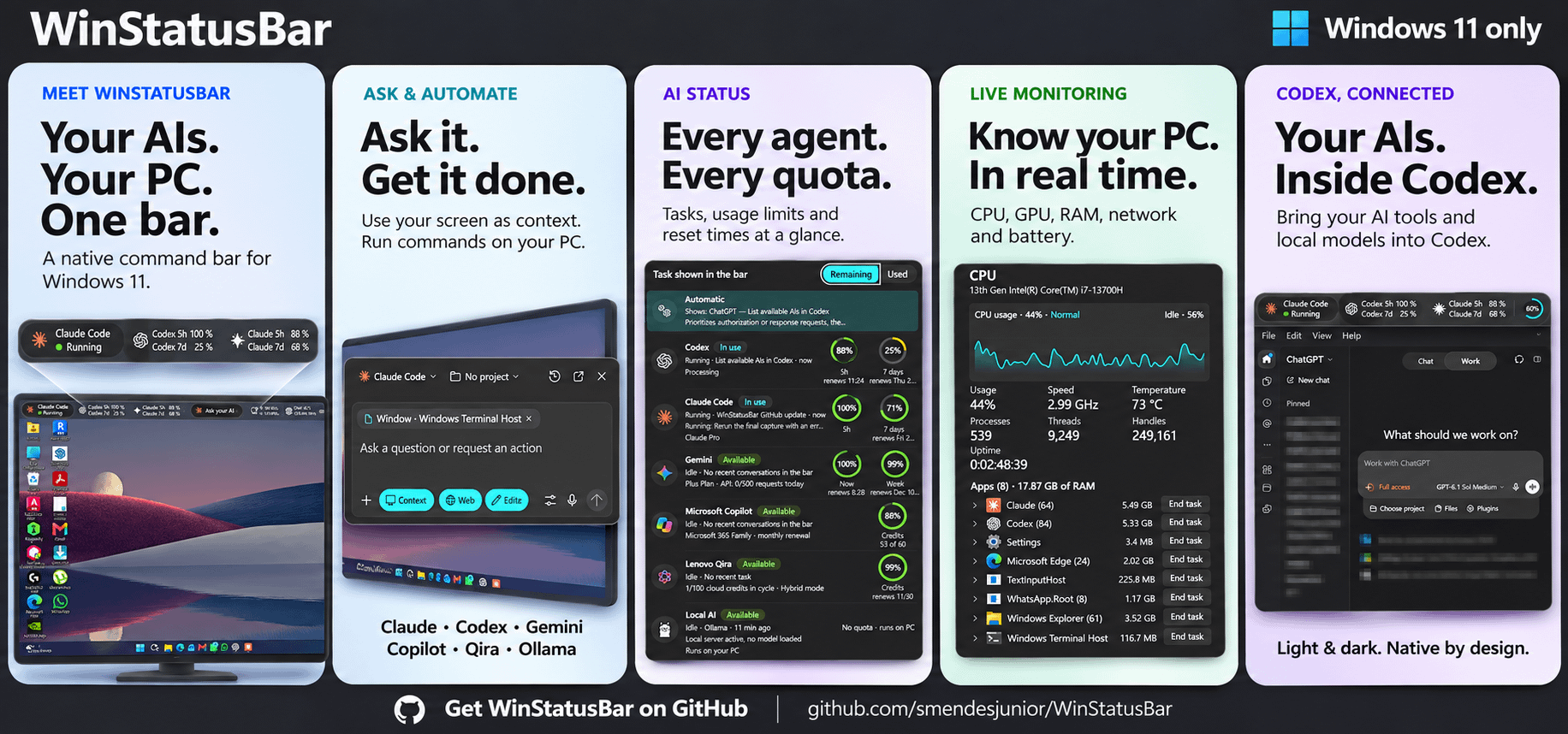
A recent post on the r/OpenAI community forum introduces a side project titled WinStatusBar, developed by a user who solicited feedback from the community. According to the developer’s description, WinStatusBar is a native application designed for the Windows 11 operating system. It functions as a persistent bar that docks at the top of the user’s screen, drawing an explicit design comparison to the macOS menu bar. The central premise of the software is to consolidate interactions with various artificial intelligence systems into a single, unified interface. The developer states that the application allows users to "ask any AI from anywhere" through one input box. Specifically, the cited source lists compatibility with several distinct AI backends: Claude Code, Codex, Gemini, Microsoft Copilot, Lenovo Qira, and local models executed via Ollama. The project is distributed through GitHub, with the developer directing interested users to the repository's latest release page to download and test the software. The original post notes that it received two comments from the community at the time of documentation.
The theoretical significance of WinStatusBar lies not merely in its function as a convenience tool, but in what its architecture reveals about the current fragmentation of the artificial intelligence landscape and the emerging need for omnichannel access layers. By routing a single text input to disparate backends—ranging from proprietary cloud APIs like Gemini and Microsoft Copilot to specialized coding agents like Claude Code and Codex, and further to locally hosted instances via Ollama—the application acts as a universal translation and dispatch layer. Mechanistically, this requires the software to handle different authentication protocols, API schemas, and response formats, normalizing them into a consistent user experience within the Windows 11 environment. The inclusion of both remote commercial services and local open-weight models (via Ollama) is particularly notable, as it bridges the divide between cloud-dependent AI and privacy-preserving, offline computation.
However, the limits of the evidence presented in the source must be carefully delineated. The information derives entirely from a brief community forum post authored by the developer, constituting a self-reported announcement rather than an independent empirical evaluation or peer-reviewed technical paper. There are no provided metrics regarding latency differences when switching between a local Ollama instance and a cloud-based service like Microsoft Copilot. Furthermore, the post does not detail how the application handles context windows, state persistence, or error management across these heterogeneous backends. Whether the tool successfully maintains conversational continuity when a user switches from Gemini to Codex mid-session remains unspecified. Consequently, while the architectural concept is clearly stated, its practical reliability, security posture, and performance characteristics in sustained use are undocumented in the provided source.
When considering the implications of such a tool for teaching and learning with AI, the relevance becomes apparent if we examine the pedagogical challenges of model diversity. In contemporary educational settings, instructors and students frequently encounter a fragmented ecosystem of AI tools. A student might use one model for general research, another for code generation, and a third, locally hosted model for processing sensitive data. Switching between these environments typically requires navigating different web interfaces, managing separate login credentials, and adapting to varying interaction paradigms. An omnichannel interface like WinStatusBar theoretically reduces this friction by providing a persistent, uniform point of entry. By docking at the top of the screen, it ensures that AI assistance is continuously accessible without interrupting the primary workflow in other applications, effectively lowering the activation energy required to consult an AI system during a learning task.
More profoundly, the ability to route queries to specific backends from a single interface invites deliberate pedagogical strategies centered on comparative AI literacy. An educator could design assignments requiring students to submit the same prompt through the WinStatusBar interface to different backends—such as comparing the output of a local Ollama model against a proprietary system like Gemini. This practice would allow students to empirically observe variations in tone, accuracy, hallucination rates, and reasoning capabilities across different architectures and training datasets. Rather than treating AI as a monolithic entity, the tool facilitates an instructional approach where the infrastructure itself becomes an object of study. Students learn not only how to prompt an AI but also how to select the appropriate computational engine for a given academic task, weighing factors such as data privacy (favoring local models) against broad knowledge retrieval (favoring large cloud models).

Additionally, the integration of specialized tools like Claude Code and Codex alongside general-purpose assistants suggests potential applications in computer science education or digital humanities courses where coding is required. A learner could utilize the same persistent interface to draft an essay using a general model and subsequently debug a Python script using a specialized coding agent, all without breaking their spatial focus on the screen. While the current evidence is limited to a developer's announcement, the conceptual framework of WinStatusBar highlights a broader trajectory in educational technology: the shift from isolated AI applications toward integrated, multi-model orchestration layers that grant learners precise control over their computational resources.